



This guide shows a practical digital marketing for restaurants setup you can implement without turning your week into content chaos.
You will leave with:
- A simple offer framework that actually drives bookings and orders
- The 2 channels that usually matter most for local restaurants (and how to run them)
- A weekly checklist to track results without spreadsheets from hell
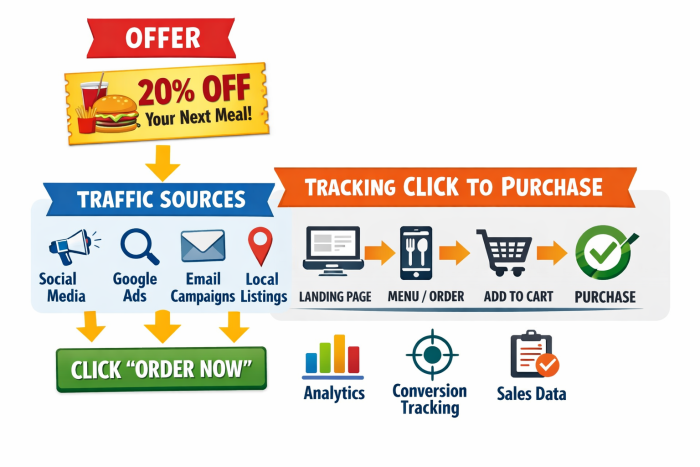
Quick answer: the 80/20 setup that works
Do these 5 things first:
- Pick one goal (reservations, online orders, or calls) and track it weekly
- Build one strong offer (weekday fill, new guest, or repeat visit)
- Fix your digital storefront (Google Business Profile + landing page)
- Run Meta ads in 2 layers: Acquisition (new) + Decision (retarget)
- Track 3 numbers: cost per result, total results, and revenue impact
Digital marketing for restaurants: step-by-step system
Step 1: Choose one goal and one “money offer”
Pick ONE primary goal for the next 30 days:
- Reservations (best for dine-in)
- Online orders (best for takeout or delivery)
- Calls / directions (best for local discovery)
Then choose ONE offer type:
Offer type A: Weekday fill
- Goal: fill slow nights
- Examples:
- “Tuesday Date Night: 2 entrees + 1 appetizer for $39”
- “Happy Hour 4 to 6: $2 off drafts + bar bites bundle”
Offer type B: New guest
- Goal: get first-time visits
- Examples:
- “First visit bonus: free dessert with any entree”
- “Grand reopening week: limited menu bundle”
Offer type C: Repeat visit
- Goal: bring people back fast
- Examples:
- “Come back in 7 days: 15% off with receipt”
- “VIP text list: weekly chef special”
Rule: your offer must be simple enough to say in 7 seconds.
Step 2: Fix your “digital storefront” (Google + one landing page)
Before you spend on ads, make sure people can find you and decide fast.
Google Business Profile (GBP) essentials
- Correct hours and holiday hours
- 15 to 30 photos that match reality (food, inside, outside, menu highlights)
- Clear categories (primary + relevant secondary)
- Menu link works
- Weekly post (one photo or short video is enough)
- Review replies (especially recent negatives)
Landing page essentials (one page is enough)
- Your offer above the fold
- 6 to 10 great photos
- Menu link
- “Book now” or “Order now” button (one primary CTA)
- Address + parking info
- 3 trust elements (rating, short reviews, press, or “best sellers”)
Example (real-world flow)
- A guest searches “tacos near me”
- Finds your GBP
- Sees photos + reviews
- Clicks the offer page
- Books or orders in under 60 seconds
Step 3: Build your local demand engine with Meta ads (the simple way)
For most independent restaurants, Meta (Facebook + Instagram) is the fastest paid channel to test.
Run two campaign layers:
Layer 1: Acquisition (new people)
- Target: 3 to 8 miles around the restaurant (adjust to your area)
- Creative: food + offer + clear CTA
- Goal: clicks to booking/order page, calls, or messages (choose one)
Layer 2: Decision (retarget)
- Target: people who engaged with IG/FB, visited the site, watched videos, or messaged
- Creative: stronger urgency and proof
- Goal: reservations/orders now
Example campaign set
- Acquisition ad: “Tuesday Date Night Bundle, limited tables”
- Retarget ad: “Still thinking about dinner? Last tables tonight”
Do this / Avoid this
- Do this: 1 offer, 2 to 4 creatives, weekly tweaks
- Avoid this: 12 campaigns, 20 audiences, daily changes
Step 4: Content that sells without overposting
Most restaurants burn out trying to “do social” like a creator. You do not need that. You need sales support content.
Use 3 content buckets:
Bucket 1: Food proof
- 10 to 20 second close-up videos
- Best sellers, not the entire menu
- Example: “Sizzle, cut, first bite”
Bucket 2: Offer reminders
- Same offer, different angle
- Example angles:
- Price anchor: “Dinner for two under $40”
- Time anchor: “Only Tuesdays”
- Social proof: “Most ordered this week”
Bucket 3: Trust
- Staff, kitchen, cleanliness, vibe
- Review screenshots, UGC reposts
Minimum cadence that works
- 2 to 3 short videos per week
- Daily stories (quick, informal)
- Repost ads as organic posts
Step 5: Turn first-time guests into repeat guests (cheap wins)
Paid traffic is expensive if you do not build retention.
Pick one:
- Email (best for longer messages and promos)
- SMS (best for quick offers, use responsibly)
- Loyalty (best if you already have consistent volume)
Simple repeat system
- Offer a “VIP list” at checkout and online:
- “Get weekly specials + last-minute openings”
- Send 1 message per week:
- 1 offer
- 1 photo
- 1 button
Example weekly SMS
“Tonight only: free appetizer with 2 entrees. Reply YES to reserve.”
Step 6: Tracking that a restaurant owner can actually use
You do not need fancy dashboards. Track these 3 weekly:
- Results: reservations, orders, calls
- Cost per result: ad spend divided by results
- Revenue impact: average ticket x results (estimate is fine)
Practical tracking tools
- UTM links for online orders and booking clicks
- A “call” button on the landing page (track calls via platform data)
- Ask staff one question for a week: “How did you hear about us?”
Example scoreboard (weekly)
- Goal: 120 reservations
- Actual: 98
- Cost per reservation: $8.50
- Top creative: “Date Night Bundle video”
- Next change: new photo angle + add urgency line
Common mistakes that waste money
- Running ads before fixing Google profile and the landing page
- Promoting the full menu instead of one offer
- Targeting too wide (you are not a national brand)
- Measuring likes instead of bookings, orders, or calls
- Changing everything every day, so you never learn what works
Weekly 30-minute checklist (copy this)
Monday (15 minutes)
- Check results vs goal
- Pause the worst creative
- Duplicate the best creative with a new hook
Wednesday (5 minutes)
- Post 1 story with the offer
- Reply to new reviews
Friday (10 minutes)
- Post 1 short video of a best seller
- Check weekend hours and booking link
FAQ
What is the best digital marketing channel for restaurants?
For most local restaurants, start with Google Business Profile for discovery and Meta ads for fast demand. Then add retention (email or SMS) to increase repeat visits.
How much should a restaurant spend on digital marketing?
Start with what you can track profitably. A common approach is to test a single offer for 2 to 4 weeks, measure cost per reservation/order, then scale only if the math works.
Should restaurants do SEO or ads first?
Fix your Google Business Profile and basic website pages first (foundation). If you need results this month, ads usually come next. SEO compounds over time, but takes longer.
How often should a restaurant post on social media?
Post enough to support your offer and keep trust high. 2 to 3 short videos per week plus daily stories is plenty for most restaurants.
What should restaurants track to know if marketing is working?
Track bookings/orders/calls, cost per result, and estimated revenue impact. If those improve month over month, the marketing is doing its job.
Conclusion + CTA
If you want digital marketing for restaurants to actually move revenue, keep it simple: choose one goal, build one strong offer, fix your Google profile, run Meta ads in acquisition plus retargeting, and track three numbers weekly.
If you want a done-for-you setup focused on results (not endless content approval loops), check Gustoma’s restaurant marketing plans here.